Capture Furniture Products in One Click
Stop manually copying product details. Our AI-powered Chrome extension extracts names, SKUs, dimensions, materials, and prices from any furniture supplier website—then exports everything to Excel.
Works with Herman Miller, Knoll, Restoration Hardware, West Elm, and 10,000+ other furniture websites
The Old Way vs. The Fringe Way
Interior designers spend up to 40% of their time on product research and data entry. We built a better way.
- • Copy product name from website
- • Switch to spreadsheet, paste
- • Go back, find SKU, copy
- • Hunt for dimensions in description
- • Download image, resize, insert
- • Repeat 50+ times per project
- • Click extension icon
- • AI extracts all product data automatically
- • Select product image from suggestions
- • Add to collection
- • Export all to Excel with images
- • Done. Move to next product.
Everything You Need to Capture Products Fast
Built specifically for interior designers, architects, and procurement professionals who source products daily.
AI-Powered Extraction
Our AI reads product pages like a human, intelligently extracting product names, SKUs, dimensions, materials, prices, and designer names—even from complex layouts.
Smart Image Detection
Automatically finds and ranks product images on any page. Select from multiple options, and the extension handles lazy-loaded images, srcsets, and all modern web techniques.
One-Click Excel Export
Export your entire product collection to a beautifully formatted Excel spreadsheet with embedded product images—ready for client presentations or purchase orders.
Collection Management
Build product collections across browsing sessions. Add notes, quantities, and contact information. Your data is stored locally and persists until you're ready to export.
Works on Any Website
Compatible with virtually any furniture supplier website worldwide. From major brands like Herman Miller to local boutique manufacturers—if it's online, we can capture it.
Editable Fields
AI not perfect? No problem. Review and edit all extracted fields before adding to your collection. Add custom notes, adjust quantities, and include supplier contact details.
See It In Action
From browsing to Excel export in four simple steps
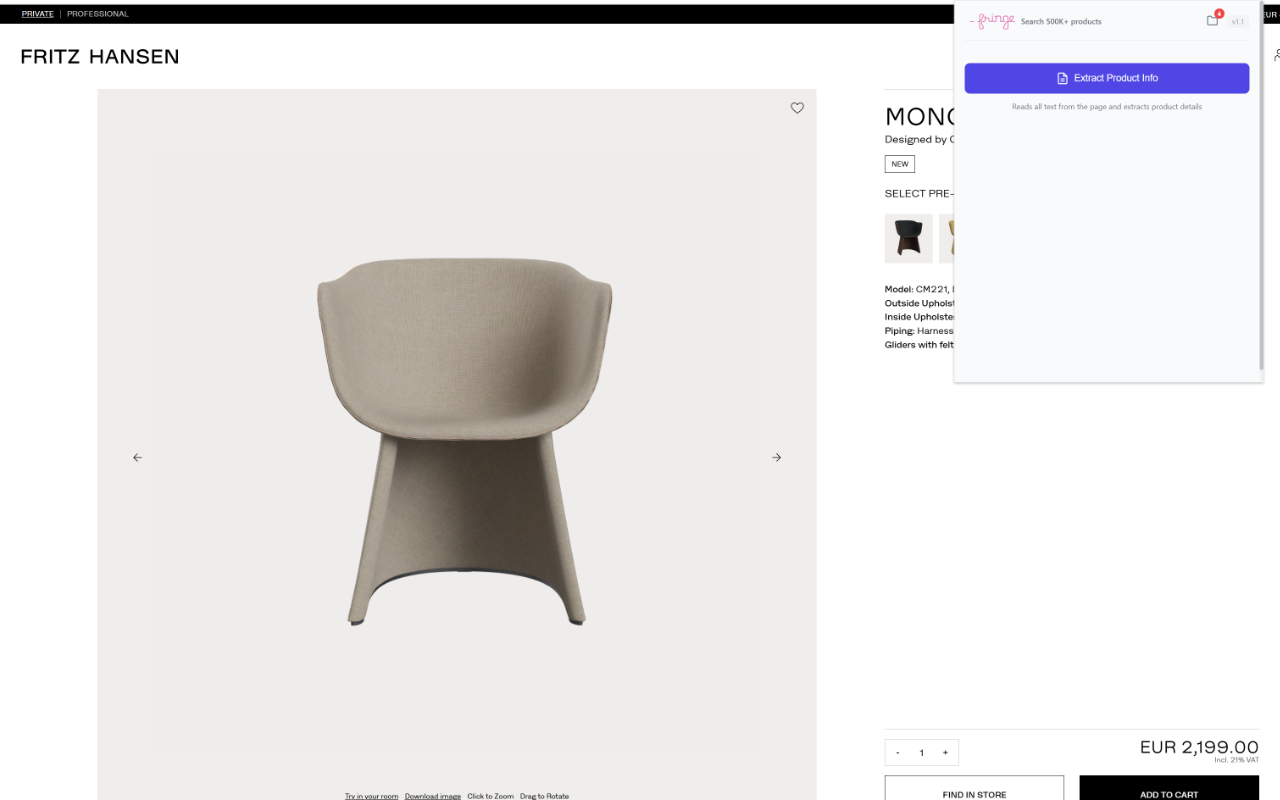
Click "Extract Product Info"
Browse to any product page on a furniture supplier's website—Fritz Hansen, Herman Miller, Muuto, or any other brand. Click the Fringe extension icon and hit "Extract Product Info."
Our AI reads the entire page and intelligently identifies all product details in seconds.
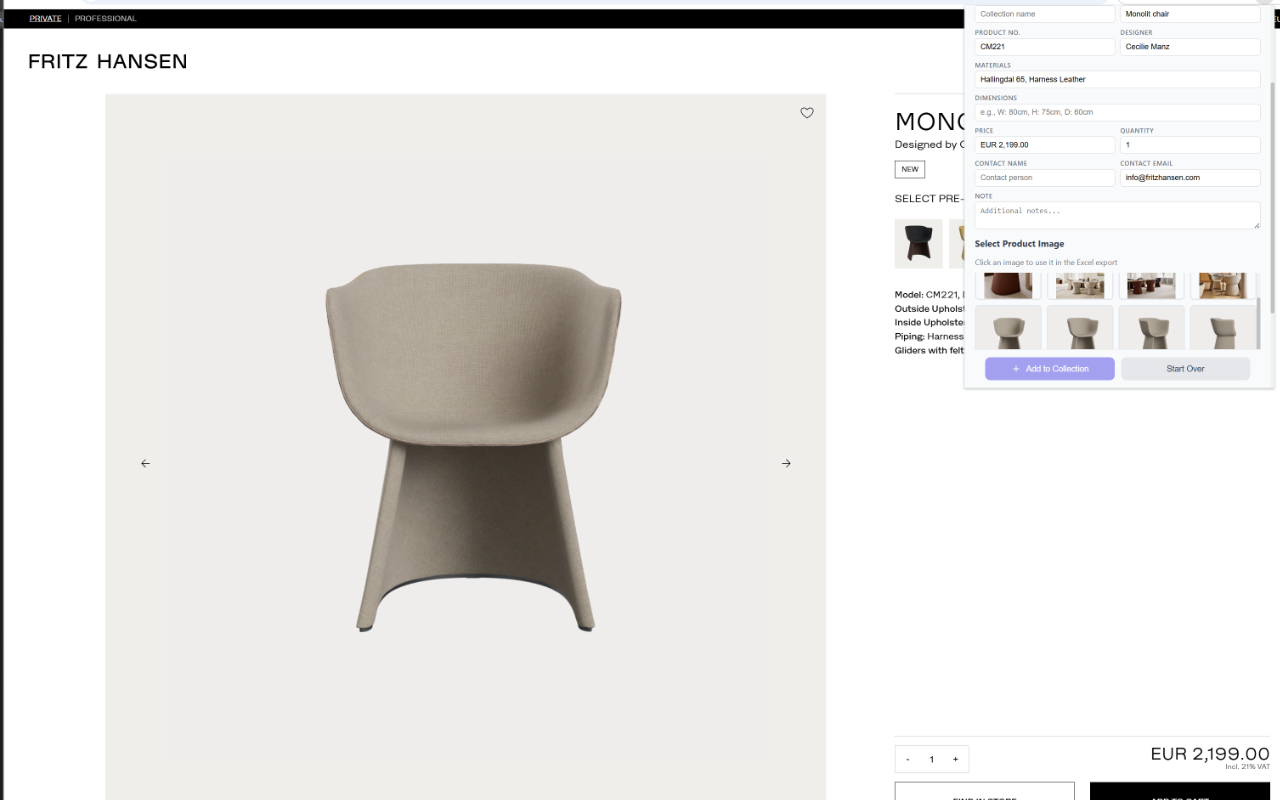
Review & Select Image
The AI automatically extracts product name, SKU, designer, materials, dimensions, price, and more. All fields are editable if you need to make adjustments.
Select the best product image from the auto-detected options. Add quantity, notes, and supplier contact information, then click "Add to Collection."
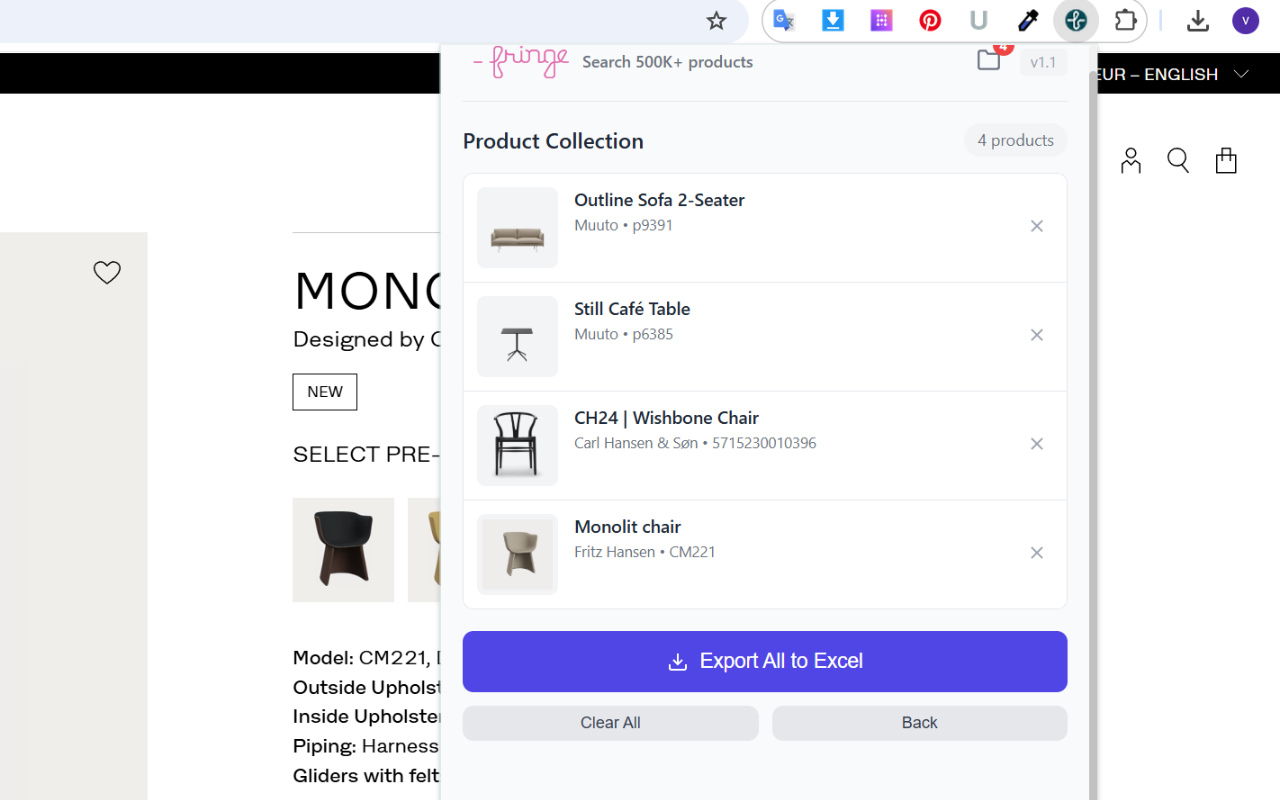
Build Your Collection
Keep browsing and adding products. Your collection persists across browser sessions, so you can build it over days or weeks.
View all collected products, remove items you no longer need, and when you're ready—export everything to Excel with one click.
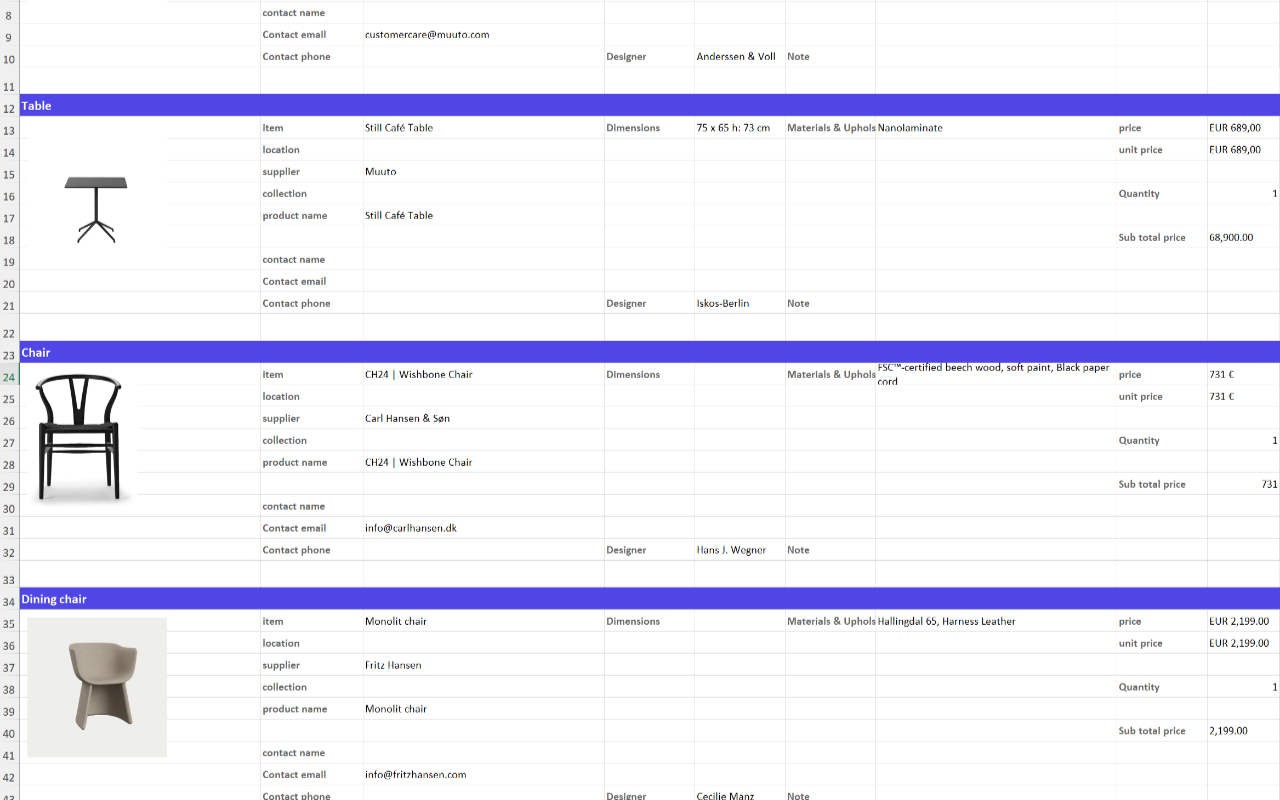
Export to Excel
Click "Export All to Excel" and download a beautifully formatted spreadsheet. Products are organized by category with embedded images.
Your export includes all product details: name, supplier, SKU, dimensions, materials, designer, price, quantity, contact info, and notes. Ready for client presentations or purchase orders.
What Gets Captured
Comprehensive product data extraction for professional specifications
Add your own quantity, notes, supplier contact name, and email for each product. Perfect for creating complete procurement packages.
Built For Design Professionals
If you source furniture and products for projects, this extension will save you hours every week.
Interior Designers
Creating product specifications and client presentations for residential and commercial projects
Architects
Specifying FF&E (Furniture, Fixtures & Equipment) for new builds and renovations
Procurement Teams
Building purchase orders and comparing products across multiple suppliers
Design Studios
Managing product libraries and standardizing how teams capture product information
Furniture Buyers
Comparing options across suppliers and building detailed comparison spreadsheets
Stagers & Stylists
Quickly capturing rental furniture options for staging and photo shoot projects
Start Capturing Products Today
Free to install. No account required. Works on any furniture website.
Add to Chrome — It's FreeRequires Google Chrome browser. Works on Windows, Mac, and Linux.
Frequently Asked Questions
Is the extension really free?
Yes, the Fringe Product Capture extension is completely free to use. There are no premium tiers, subscriptions, or hidden costs. Install it and start capturing products immediately.
What websites does it work on?
The extension works on virtually any furniture or product website worldwide. Our AI is trained to extract product information from diverse page layouts—from major brands like Herman Miller and Fritz Hansen to local boutique manufacturers.
Is my data secure?
Yes. Your product collections are stored locally in your browser using Chrome's secure storage. We only process page text through our AI for extraction—we don't store your browsing history, collected products, or personal information on our servers.
What if the AI extracts incorrect information?
All extracted fields are fully editable before you add a product to your collection. You can review, correct, or enhance any information the AI might have misidentified. Think of the AI as a helpful first draft that you can refine.
Can I use this for commercial projects?
Absolutely. The extension is designed specifically for professional use. Export your collections to Excel for client presentations, FF&E schedules, procurement documentation, or internal design reviews.
Do I need a Fringe Interior account?
No account is required. Simply install the extension from the Chrome Web Store and start capturing products immediately. The extension works completely standalone.
What product information gets captured?
The AI extracts: product category, supplier/brand, collection name, product name, SKU/model number, designer, materials, dimensions, and price. You can also add custom fields like quantity, notes, and supplier contact details.
How does the image selection work?
The extension automatically scans the page and finds all product images, filtering out logos, icons, and irrelevant graphics. You'll see a grid of images to choose from—just click the one you want to include in your export.
Will my collection be lost if I close the browser?
No. Your product collection is saved locally and persists across browser sessions. You can build your collection over days or weeks, then export when you're ready. Collections are only cleared when you explicitly choose to clear them.
What format is the Excel export?
The export creates a standard .xlsx Excel file that works with Microsoft Excel, Google Sheets, and other spreadsheet software. Products are organized by category, with embedded product images and all captured data fields.
Does it work on password-protected or logged-in pages?
Yes. The extension extracts information from whatever page you're viewing in your browser. If you're logged into a trade account or viewing a protected page, the extension can capture that content.
How is this different from copying and pasting manually?
Manual copy-paste takes 10-15 minutes per product and is error-prone. Fringe captures all product data in about 30 seconds with AI-powered extraction, automatic image detection, and one-click Excel export with embedded images.
Brought to you by

Fringe Interior is the world's largest AI-powered interior design product database with 232,000+ products from 1,900+ brands. Search naturally, discover products faster.
Explore Fringe Interior →